Monday, December 6, 2010
Blue Champion
 11:10 PM |
 Posted by
Graphics Talk |


Template dengan warna dasar Biru muda yang mencerminkan keceriaan atas tercapainya sebuah keberhasilan.
Silakan didownload. Caranya pakainya tinggal download xml filenya dan copy kan ke templates yang ada di Blogger agan semua.
Silakan didownload. Caranya pakainya tinggal download xml filenya dan copy kan ke templates yang ada di Blogger agan semua.

Saturday, May 23, 2009
How does a hovercraft work?
A hovercraft travels over land and water on a cushion or bubble of low-pressure air. A hovercraft has one or more blowers that blow air underneath the craft, which is contained by a skirt. The skirt that is around the perimeter of the hovercraft performs an extremely important function in containing the air cushion. By using a skirt, the amount of engine power required to lift the craft is considerably reduced and as an added benefit, extra hull surface clearance is obtained. The skirt is a long strip of material that is mounted onto the underside of the craft. When the skirt is inflated, it lifts the hovercraft. The escaping air coming from where the skirt touches the ground is what creates a friction-less cushion of air. Because the hovercraft has practically no friction, it takes little force to move the craft.

The diagram above shows the basic principle of a hovercraft. Air is directed underneath the craft by a blower, and the air that escapes out of the flexible skirt creates a near frictionless environment which enables the craft to hover. The craft can move forward and turn by using propellers to propel the craft.
The hovercrafts shown on xinventions either use a leaf blower of vacuum cleaner engine for lift. The larger hovercraft uses an engine for propulsion while the smaller hovercraft has none however one can easily be attached.
The hovercrafts shown on xinventions either use a leaf blower of vacuum cleaner engine for lift. The larger hovercraft uses an engine for propulsion while the smaller hovercraft has none however one can easily be attached.
 Labels:
Thursday, April 30, 2009
Object Dock
Jealous of that slick Mac interface? Check out ObjectDock, a free utility that replaces the Windows Taskbar with a colorful, animated dock similar to the taskbar in Mac OS X.
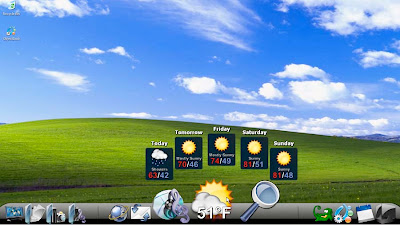
ObjectDock displays icons for currently running applications and can hold quick-launch icons for your favorite programs. As you pass the cursor over each icon, ObjectDock magnifies it and displays relevant information, helping you find what you need even when you're running several programs at once. An attractive clock rounds out the toolbar. The tiny utility comes with a dozen attractive skins, and users with slow computers can reduce the animation quality to increase speed.
There is one major drawback: the lack of a system tray. There is a free, imperfect docklet plug-in available from a third-party provider that valiantly tries to remedy the problem, although it's a bit buggy. You can also upgrade to the Plus edition for $20, which includes system tray support, tabbed docks, support for multiple docks and multiple monitors, and other features.
If you're dissatisfied with the Windows Taskbar or just want to spice up your Desktop, ObjectDock makes a very good, no-risk choice.
Try it, download it now http://www.stardock.com/products/objectdock/
Subscribe to:
Posts (Atom)
Popular Posts
-
 A hovercraft travels over land and water on a cushion or bubble of low-pressure air. A hovercraft has one or more blowers that blow air unde...
-
Do you like to connect to your Mobile Boardband internet through Ubuntu? Do you like to send SMS through your mobile board internet? ...
-
Data can be lost in different ways some of them are because of hardware failures,you accidentally delete or overwrite a file. Some data loss...
-
 Jealous of that slick Mac interface? Check out ObjectDock, a free utility that replaces the Windows Taskbar with a colorful, animated dock s...
-
To get a visual indication of all module positions used on a page you can follow this procedure:- Joomla 1.6 In the administrative backend...
-
Template dengan warna dasar Biru muda yang mencerminkan keceriaan atas tercapainya sebuah keberhasilan. Silakan didownload. Caranya pakainy...
-
Daftar Radio Online (Streaming Radio) di Indonesia Wirya.com - Radio Online 24/7 | Jakarta | winamp | http://cas...
-
 Hai semua, tentunya kita Bete kalo komputer kita tiba-tiba hang atau restart sendiri atau yang lebih parah Blue Screen of Death keluar deng...
-
Jawabannya, BISA... kenapa engga???. Didalam situs Facebook segudang fitur yang diberikan oleh Facebook. Salah satunya fitur blogging. Tapi ...
-
Selamat pagi rekans, apa kabarnya ? 3 minggu ngga aktif nulis karena serangan virus. W32:Vitro dan W32:Junkpolly they called. Virus ini belu...

